
Shopify Gift Cards
UserLoop can automatically create a Shopify gift card whenever a customer completes your survey. The gift card is emailed directly to the customer by Shopify, including a link back to your store.
How to Set Up Gift Cards
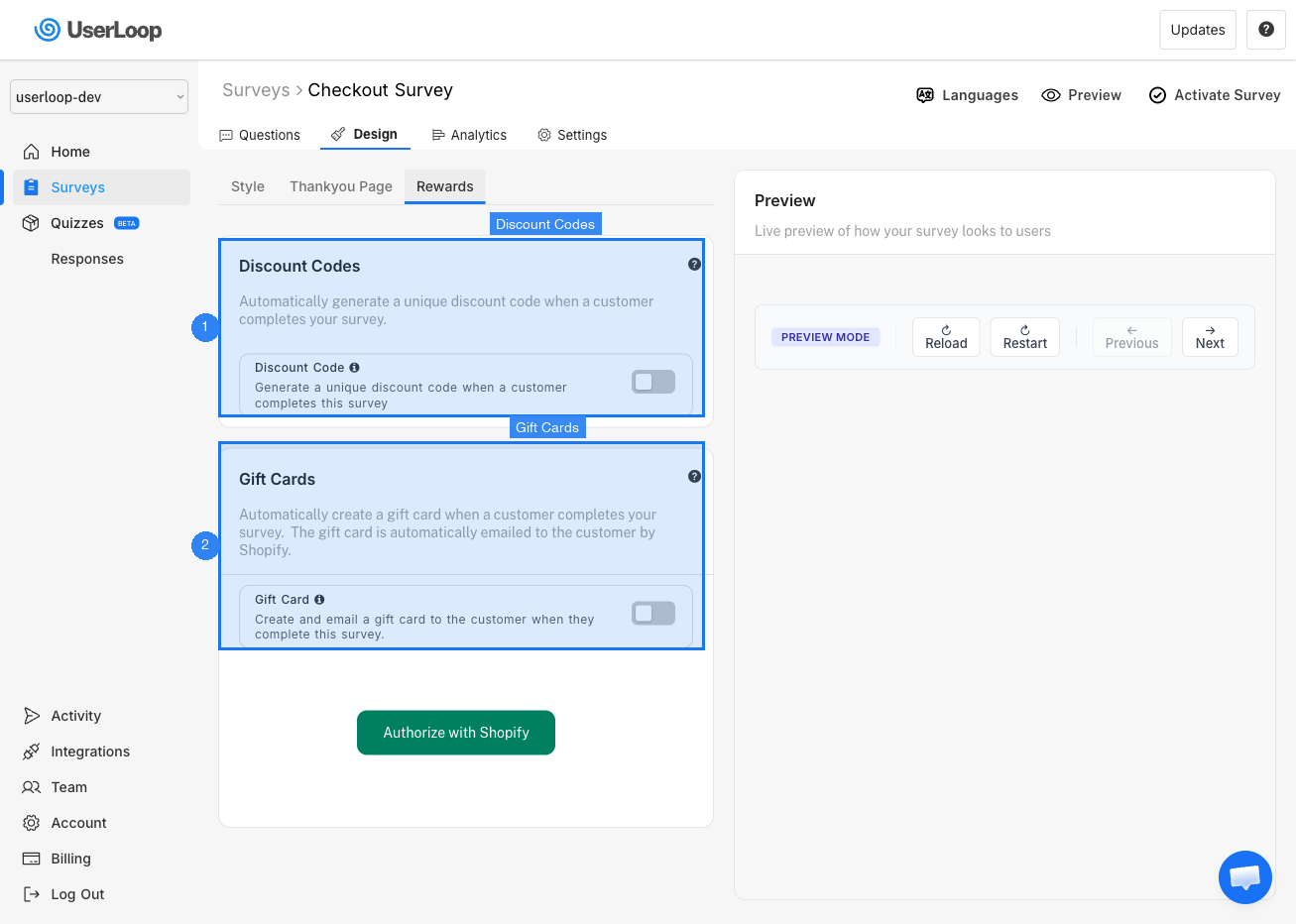
1. Go to Surveys and select your survey.
2. Click the Design tab.
3. Select the Rewards sub-tab.
4. Toggle on Gift Card.
5. You may need to click Authorize with Shopify to grant UserLoop permission to create gift cards.
6. Set the gift card value (in your store's currency) and expiry date.
How Gift Cards Are Delivered
Once a customer completes your survey, Shopify automatically generates a unique gift card and emails it to the customer. The email includes a link to your store, encouraging them to come back and make a purchase.
Good to Know
- One card per customer — Each customer receives one gift card per survey completion.
- Branding — The gift card email uses your store's branding and is sent directly from Shopify.
- Eligibility — Gift cards are available for customers who have made at least one purchase from your store.
Use Cases
- Incentivize customers to complete longer surveys.
- Reward loyal customers for sharing feedback.
- Run competitions or influencer collaborations.
Need Help?
If you have any questions about setting up gift cards, reach out to us via live chat and we'll be happy to help.
Updated on: 26/02/2026
Thank you!