
Targeting
Checkout survey questions have two targeting settings that let you control which customers see each question. These settings are only available on Checkout surveys.
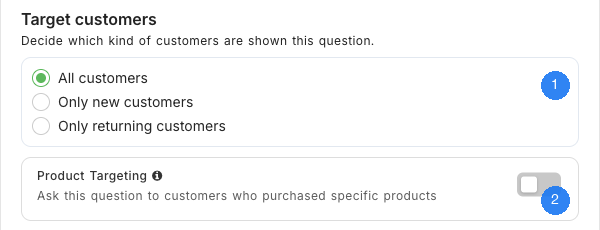
Customer Targeting
Control which customers see each question based on their purchase history:
- All customers (default) — Every customer sees the question.
- Only new customers — Only first-time buyers see the question.
- Only returning customers — Only repeat buyers see the question.
This is useful when you want to ask different questions to different customer groups. For example, you might ask new customers "How did you hear about us?" while asking returning customers "What brought you back?".
Product Targeting
When enabled, the question is only shown to customers who purchased specific products. You can select one or more products from your store, and the question will only appear when a customer's order includes at least one of those products.
This lets you ask targeted feedback questions about particular items. For example, if you launched a new product, you could create a question that only appears for customers who bought that specific product.
Combining Targeting Options
You can use both Customer Targeting and Product Targeting together. For example, you could show a question only to returning customers who purchased a specific product — useful for tracking how repeat buyers feel about a particular item compared to their previous purchases.
Need Help?
If you have any questions about targeting, reach out to us via live chat and we'll be happy to help.
Updated on: 26/02/2026
Thank you!